
SOLUTIONS · MICROSOFT PURVIEW
Give Microsoft Purview your own document categories, in your own languages
Purview applies retention and sensitivity labels well once it knows what a file is. Telling it what a file is, in your organization's own terms, is the hard part, and for documents in Arabic, French, German or Spanish a custom Purview classifier can't help, because Microsoft supports custom classifiers in English only. StayCharted learns your categories from documents your team has already sorted, in the languages they're written in, and a Power Automate flow writes the category to each new file in SharePoint. After your administrator maps the column to a searchable managed property, Purview's retention auto-apply policies read it and apply the label you chose for each category.
- Arabic, European languages and English in one model. Train on the documents you have, whatever language each is in, and check the accuracy on your own files before you use it.
- Your categories in one model. Cover document types such as contracts, invoices, HR files and engineering records.
- A confidence on every answer. Configure your flow to send unsure answers to a person before applying a label.
- Better every month. Corrections from reviewers go into the next version's training, and you publish it when the report shows it's better.
Where custom classifiers in Purview stop
Purview includes trainable classifiers, and you can build your own by giving it examples of content that is in a category and content that isn't. Microsoft documents some limits that matter for business categories:
| Purview custom trainable classifier | StayCharted model | |
|---|---|---|
| Categories | One category per classifier, trained on examples that are in it and examples that aren't | All your categories in one model, trained on files your team has already sorted |
| Languages | English only | Around 100, including Arabic, French, German, Spanish, Italian and Dutch; one model can learn from documents in several languages |
| After publishing | Can't be retrained; to improve one, you remove it and start again with more samples | Retrain whenever you like; reviewed answers become training examples, and you choose when to publish the new version |
| Accuracy you can see | Test results while you train | A report on held-out files for every version, per category, plus the cutoff where a person should review |
| Where it's used | Auto-labeling with sensitivity labels, auto-applying retention labels, DLP | Anywhere your flow can read and write: SharePoint, OneDrive, Google Drive, Outlook, Teams, Dataverse and other systems through the API |
Purview's built-in classifiers and sensitive information types still do their job: finding credit card numbers, health records, source code and the other content Microsoft has trained them on. StayCharted is for the categories only your organization uses.
Documents in Arabic and European languages
Most organizations with offices in the Gulf, North Africa or Europe keep documents in more than one language: Arabic contracts next to English ones, German and French files in European subsidiaries, Spanish and Portuguese correspondence in others. A custom Purview classifier can only be trained on the English ones, so other languages need a different classification approach or manual sorting.
StayCharted's AI Classifier Model reads meaning in around 100 languages. In Europe and the Middle East that includes Arabic, French, German, Spanish, Italian, Dutch, Portuguese, Polish, Swedish, Danish, Norwegian, Finnish, Czech, Romanian, Hungarian, Greek and Turkish. A Dedicated AI Model, on Business, is trained on your own examples; evaluate it on representative documents in each language you need. Either way, one model can learn from documents in several languages at once, and the category it returns is the same value whatever language the document is in. That matters for Purview, because an auto-apply policy matches the column's value exactly: an Arabic supplier contract and a German one both come back as "Supplier contract", and both get the same retention label.
Before you publish a model, the report shows how often it's right on your own documents that it never saw during training, per category. Include examples in each language you want covered, and check the report for those categories before relying on it.
How it works
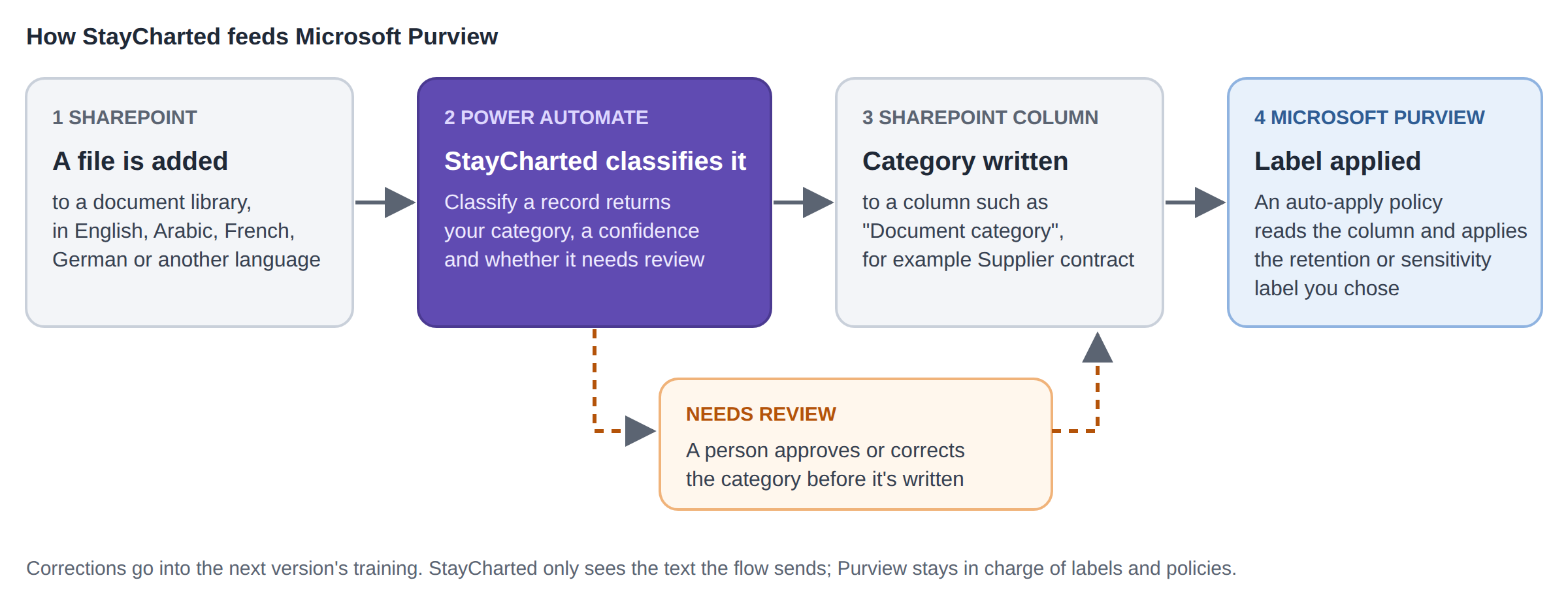
- Train on files you've already sorted. Export a list of documents with the category your team gave each one: the library and folder, the file name, or text from the document. StayCharted checks the examples, trains, and shows how often the model is right on files it never saw.
- Classify each new file in Power Automate. A flow starts when a file is added to a SharePoint library and sends its name or text to StayCharted's certified connector. The answer, its confidence and whether it needs review come back in the same step.
- Write the category to a column. The flow writes the answer to a column such as "Document category" on the file. When the answer needs review, the flow starts an approval first and writes the column once a person confirms it.
- Let Purview act on the column. Map the column to one of SharePoint's refinable managed properties, then create a retention label auto-apply policy with a KQL query on it, for example
RefinableString00:"Supplier contract". Purview applies the label on its own schedule. Sensitivity labeling is a separate configuration. Do not assume a retention-label query also applies sensitivity labels; have your Microsoft administrator validate the supported conditions in your tenant.
You can also apply a retention label straight from the flow, with the Apply a retention label on the item action in Power Automate, if you'd rather label each file as soon as it's classified.
The retention steps follow Microsoft’s documented setup; we have not yet run this complete Purview workflow in our tenant. Configure approval routing explicitly in the flow. For the connector, send a single text field; use the HTTP action when your model expects a structured multi-column input.
What stays the same
- Purview stays in charge of labels. Your compliance team decides which category gets which label and policy, in Purview, as today.
- StayCharted doesn't connect to your tenant. Power Automate sends the file name or text you choose, and StayCharted answers. It doesn't read your libraries, change labels or change permissions.
- Your data trains only your model. Examples and answers stay in your workspace and aren't used to train anyone else's model.
Good first projects
- Contracts and supplier documents: sort agreements, amendments, NDAs and statements of work so each gets the right retention period.
- HR files: separate offer letters, reviews and policy acknowledgements before a sensitivity label is applied.
- Engineering and quality records: tell drawings, inspection reports and certificates apart for records management.
- Shared drives being moved to SharePoint: classify old files during the move, so they arrive with a category and a label instead of a backlog.
- Regional offices under one policy: classify Arabic, French and German files into the same categories as head office, so one set of retention labels covers every country.
Microsoft documentation
Common questions
Does this replace Purview's trainable classifiers?
No. Purview's built-in classifiers keep finding the content Microsoft trained them on. StayCharted adds your own categories, in one model you can retrain, and writes them where Purview's policies can read them.
Which languages does it work in?
An AI Classifier Model reads around 100 languages, including Arabic, French, German, Spanish, Italian, Dutch, Portuguese, Polish, the Nordic languages, Czech, Romanian, Hungarian, Greek and Turkish. Evaluate a Dedicated AI Model on representative examples in each language you need. Our published benchmarks are in English, so the report on your own documents is the number to go by for each language.
Can the categories be in Arabic?
Yes. Categories are whatever your team used when it sorted the examples. Keep each category's name the same across languages, because Purview's policy matches the exact value written to the column.
Do I need extra Microsoft licenses?
You need a Power Automate license that includes Premium connectors for the StayCharted connector, and the Purview licensing your auto-apply and auto-labeling policies already require. Your Microsoft administrator can confirm both.
How quickly is a label applied?
The flow writes the category when it runs successfully; timing depends on the trigger and flow. Purview auto-apply policies run on Microsoft’s schedule and can take several days for a new policy. The Apply a retention label on the item action applies the label when that action runs.
What if the model is wrong?
Every answer has a confidence, but confident answers can still be wrong. Configure the flow to send answers below your cutoff to a person before writing the column, and sample confident answers too. Corrections confirmed in StayCharted’s Review Queue can join the next version’s training.
Does StayCharted read the documents?
Only the text your flow sends it. If you send the file name and folder, that's all it sees.
Which plans?
Essentials and Business include the API and the Review Queue.
Put it into practice
Classify files with Power Automate →
Microsoft, Microsoft Purview, Power Automate, SharePoint and OneDrive are trademarks of the Microsoft group of companies. StayCharted is not affiliated with Microsoft.